
...
1. Log in to the PAMS external website at: https://pamspublic.science.energy.gov/.
| For guidance on logging in, refer to Logging In. |

2. Click the the Tasks with a deadline link located in the Tasks Assigned To You section on the PAMS homepage (Figure 1).
...
3. PAMS will navigate you to the Pending Tasks – List page, which displays all of the tasks assigned to you in PAMS. Find the Complete Revised Budget task you would like to complete, and click Start Revised Budget in the Options column (Figure 2). If necessary, use the filters in the grid or click the Search link on the right above the grid to find a specific Complete Revised Budget task.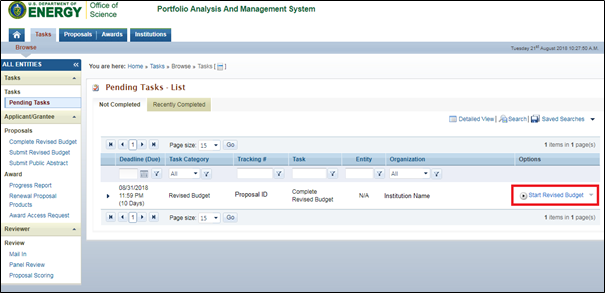
Figure 2. Pending Tasks – List – Start Revised Budget
| Anchor | ||||
|---|---|---|---|---|
|
| Anchor | ||||
|---|---|---|---|---|
|
...
Element | Description |
A. Senior/Key Person | List all senior/key personnel. This includes the PI and any Co-PIs. (Figure 5) |
B. Other Personnel | List all other non-essential personnel. (Figure 6) Non-essential personnel includes: · Post-Doctoral Associates · Graduate Students · Undergraduate Students · Secretarial/Clerical · Engineers · Technicians · Other (up to 4) |
C. Equipment Description | List all project equipment. (Figure 7) |
D. Travel | List all travel costs (Figure 8). Travel costs include: · Domestic Travel Costs · Foreign Travel Costs |
E. Participant/Trainee Support Costs | List all participant and trainee support costs for the duration of the project (Figure 9). Participant/Trainee Support Costs include: · Tuition/Fees/Health Insurance · Stipends · Travel · Subsistence · Other |
F. Other Direct Costs | List all other direct costs to the project (Figure 10). Direct Costs include: · Materials and Supplies · Publication Costs · Consultant Services · ADP/Computer Services · Subawards/Consortium/Contractual Costs · Equipment or Facility Rental/User Fees · Alterations and Renovations · Other (up to 3) |
G. Direct Costs | This section will automatically populate based on the entries made in the previous sections. (Figure 11) |
H. Indirect Costs | List all indirect costs to the project (overhead, G&A, etc.). (Figure 12) |
I. Total Direct and Indirect Costs | This section will automatically populate based on the totals of the Direct Costs and Indirect Costs sections. (Figure 13) |
J. Fee | Fee is a % of the total cost of the project. (Figure 14) |
K. Cost of Project | This section will automatically populate based on the totals calculated from the previous sections. (Figure 15) |
| If the Proposal was submitted with a Total Fed/Non-Fed Budget form, sections A-K will display the following additional columns to clarify the breakout of Federal versus Non-Federal amounts in the budget:
|

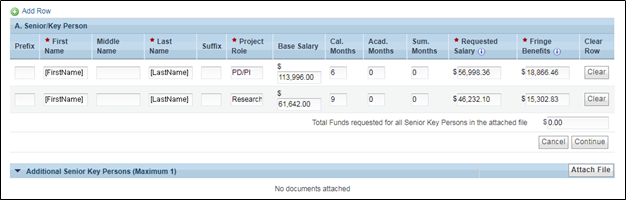
Figure 5. Complete Revised Budget – Budget – Senior/Key Person
...