
...
1. Log in to the PAMS external website at: https://pamspublic.science.energy.gov/.
| For guidance on logging in, refer to Logging In. |

2. Click the the Tasks with a deadline link located in the Tasks Assigned To You section on the PAMS homepage (Figure 1).
...
3. PAMS will navigate you to the Pending Tasks – List page, which displays all of the tasks assigned to you in PAMS. Find the Complete Revised Budget task you would like to complete, and click Start Revised Budget in the Options column (Figure 2). If necessary, use the filters in the grid or click the Search link on the right above the grid to find a specific Complete Revised Budget task.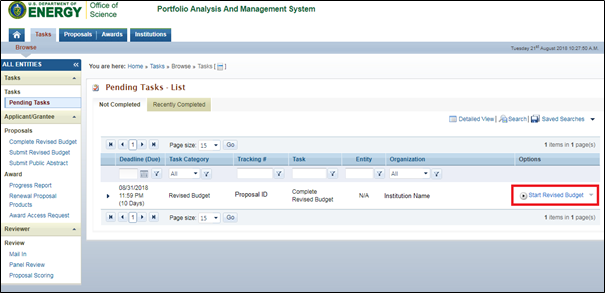
Figure 2. Pending Tasks – List – Start Revised Budget
| Anchor | ||||
|---|---|---|---|---|
|
| Anchor | ||||
|---|---|---|---|---|
|
...